

FCaptcha v1.34: Seven Releases About Not Blocking Humans
Most of FCaptcha v1.28–v1.34 protects the visitor who did nothing wrong: expired tabs, sparse mouse traces, invisible mode. Plus one breaking change.
bot-detectionBenchmark bot detection in shadow mode, measure precision and recall, protect shared-IP users, and roll out enforcement without losing customers.
The fastest way to lose confidence in bot protection is not to miss a bot. It is to block a real customer.
A missed scraper costs bandwidth or content. A blocked customer can cost a sale, a support escalation, and trust that took months to earn. That is why a bot detection benchmark cannot stop at a single accuracy number. It has to answer a harder question: what happens to real people when this policy leaves the dashboard and starts controlling traffic?
This guide lays out a practical way to answer that question. It covers precision and recall, labeled test sets, shadow mode, canary enforcement, verified-bot allowlists, shared IP addresses, low-volume attacks, and conversion measurement. The goal is not to make a detection system look impressive. The goal is to learn how aggressively it can act without making customers pay for its mistakes.
In bot detection, a false positive is legitimate traffic classified as automated or abusive. The technical label matters, but the consequence matters more.
The same wrong classification can produce very different outcomes:
| Route | Possible false-positive cost |
|---|---|
| Public article | One page view is challenged or delayed |
| Login | A customer cannot reach their account |
| Password reset | A locked-out user cannot recover access |
| Checkout | Revenue is interrupted at the point of purchase |
| Public API | A partner integration begins failing |
| Account creation | A legitimate prospect cannot start a trial |
An aggregate false-positive rate hides these differences. A vendor can report a low global rate while causing concentrated damage on one browser, one mobile network, or one high-value route. Measure the error where it happens and attach it to the outcome it can change.
That means the useful question is not, “What is the false-positive rate?” It is, “How many known-human sessions did this rule challenge or block on each protected route, and what happened next?”
Bot traffic is a class-imbalanced problem. Most requests on many customer-facing applications are legitimate, while the attacks worth stopping are a small part of the total. In that setting, a large accuracy percentage can describe a weak detector.
Suppose a site receives 100,000 requests:
The detector is 99.7 percent accurate. That sounds excellent. It is also blocking or challenging 200 real requests, missing 100 attacks, and producing a bot verdict that is wrong almost one time in six.
Use a small set of metrics together instead:
Precision = true bot detections / all bot detections
Recall = true bot detections / all actual bot attempts
False-positive rate = false bot detections / all known-human requests
In the example, precision is 81.8 percent, recall is 90 percent, and the false-positive rate is about 0.2 percent. At one million legitimate requests per day, that last number represents about 2,000 customer requests receiving the wrong treatment.
Google’s classification metrics guide makes the underlying tradeoff clear: changing a threshold changes precision, recall, and the false-positive rate. There is no threshold that can be evaluated independently of the cost of each kind of mistake.
For bot mitigation, this usually leads to three operating goals:
One score should not control all three actions.
A benchmark is only useful if its traffic resembles the traffic your policy will see. A clean laboratory set with one Chrome version and a few obvious Selenium scripts may prove that the code runs. It does not establish that the detector is safe for customers.
Build the test set from three label groups.
Strong human labels can come from successfully authenticated sessions, completed purchases that were not reversed, support-confirmed sessions, or employees following a controlled test plan. None is perfect on its own. The point is to collect traffic with independent evidence that a real person completed a meaningful action.
Keep the sample representative across:
If the known-human set contains only employees on recent MacBooks, the benchmark is measuring employee laptops, not customers.
Run your own controlled clients with Playwright, Puppeteer, Selenium, curl, HTTP libraries, and any automation stack relevant to the application. Replay recorded attack sequences where doing so is safe. Include slow bots, distributed low-volume clients, headless browsers, and scripts that carry realistic headers.
Trusted automation also belongs in the set. Search crawlers, uptime monitors, accessibility scanners, payment callbacks, and partner integrations are automated, but that does not make them hostile. A useful system identifies them before policy decides whether they should pass.
Leave genuinely ambiguous production traffic labeled as unknown. Do not call every session that failed to convert a bot, and do not call every session that passed a JavaScript check human. Those shortcuts make the detector’s own assumptions part of its ground truth.
Unknowns can still be scored, clustered, and reviewed. They should not be quietly counted as proof that the detector was correct.
Record the exact configuration used for every verdict:
If thresholds change halfway through the test without a version marker, the final precision number combines two different systems. That makes regressions difficult to reproduce and rollback decisions harder than they need to be.
A useful event can be as simple as:
{
  "policy_version": "checkout-2026-09-01.1",
  "route_group": "checkout",
  "score": 72,
  "would_action": "challenge",
  "signals": ["headless_mismatch", "velocity_anomaly"],
  "identity": "unverified",
  "outcome": "purchase_completed"
}
The important field is outcome. Without it, you can count detections but cannot tell whether a proposed action would have interrupted a customer.
Shadow mode evaluates every request but does not change the response. A request that would have been challenged receives the normal page. A request that would have been blocked reaches the application. The proposed action and its evidence are logged for analysis.
This is the safest place to tune thresholds because the detector sees real traffic while mistakes remain observable rather than customer-facing.
During shadow mode, answer these questions for every route group:
Do not declare victory after a quiet afternoon. The sample should include weekday and weekend behavior, billing cycles, product launches, marketing campaigns, and the customers most likely to use unusual networks or automation.
The absence of an observed false positive is not proof that the true rate is zero. A useful rough check is the rule of three: if a test observes zero errors in N independent known-human sessions, the upper edge of a rough 95 percent confidence interval is about 3/N. Zero errors in 1,000 sessions only supports a rate below roughly 0.3 percent. Zero errors in 100,000 sessions supports a much tighter claim.
The WebDecoy Rules product starts enforcement workflows in monitor mode so teams can inspect proposed actions and the evidence behind them before traffic is affected.
Low-volume attacks make ordinary accuracy reporting especially fragile. A credential stuffer that sends two attempts per IP per day may never create an obvious request spike. A scraper that takes one page every few minutes can blend into human traffic. If the positive class contains only a handful of confirmed attacks, one mislabeled session can swing precision or recall dramatically.
Use four tactics:
Collect enough normal traffic to see rare customer conditions and enough attack traffic to calculate more than a one-day anecdote. Report counts beside rates so readers can see whether 100 percent recall means 2 of 2 attacks or 20,000 of 20,000.
Recorded request sequences let you compare policy versions against the same inputs. Replay is valuable for regression testing, but keep it separate from live results because a recording cannot reproduce every timing, network, and browser condition.
Throttle your own automation to the rate an attacker would use. Rotate addresses if that behavior is in scope. Use realistic sessions and route order instead of sending a single obviously malicious request thousands of times.
Low request rate does not erase other evidence. A client may still fail identity verification, reuse a composite fingerprint across accounts, follow a decoy link, submit an impossible field, or move through a workflow with machine-like consistency. Rate should be one signal, not the whole detector.
A crawler allowlist reduces false positives only if it verifies identity. Matching Googlebot in a User-Agent creates a bypass because any client can send the same text.
Google recommends verifying Googlebot with its published IP ranges or reverse DNS followed by forward confirmation. Its own documentation warns that the User-Agent is commonly spoofed. The same principle applies to other search crawlers, AI crawlers, monitoring services, and partner automation.
A safe automated-client decision looks like this:
Declared identity
    -> verify source or signature
        -> verified: apply the crawler or partner policy
        -> failed: treat as impersonation evidence
        -> unavailable: keep unverified and avoid claiming certainty
Do not turn a failed lookup into an automatic block if the source data may be stale or unavailable. Record why verification failed and choose a route-appropriate fallback. Public content can often fail open. Sensitive APIs may require a service token or a different proof.
WebDecoy’s crawler verification tools and Agent Identity product show the difference between a declared name and a verified operator.
An IP address is a network location, not a person. A single address may represent an office, university, hotel, mobile carrier, VPN exit, managed browser service, or large customer integration. One abusive client behind that address does not make every other client hostile.
This is why an IP-only block can look accurate in a lab and fail in production. The test environment assigns one address per client. Production puts hundreds or thousands of unrelated sessions behind the same egress point.
Treat IP reputation and request rate as context. Correlate them with session evidence, authentication state, route, TLS and browser characteristics, and behavior. When uncertainty remains, challenge the session rather than blocking the address.
Also test rate limits from a shared-network simulator. Send legitimate traffic from many independent sessions through one source address, then add one abusive session. The desired result is not merely “the attack stopped.” It is “the attack stopped while the other sessions continued.”
Once shadow results meet the route’s safety threshold, enforce on a small, stable cohort. Assignment should be sticky by session or account so the same visitor does not move between control and enforcement on every request.
A practical rollout sequence is:
Start with an action that can recover. A challenge lets a misclassified human prove the detector wrong and continue. A hard block provides no such information unless the customer opens a ticket.
Define rollback triggers before the canary begins. Examples include:
If a trigger fires, return the cohort to monitor mode, preserve the evidence, and investigate the rule that contributed the decision. A rollback is a successful safety mechanism, not a failed launch.
Security metrics cannot tell you whether customers are being harmed. Join the enforcement decision to product outcomes using a privacy-conscious session or account key.
For a trial signup flow, measure:
For login, checkout, and API routes, choose outcomes that reflect their job. Login needs successful authentication and recovery completion. Checkout needs payment completion and fraud outcomes. APIs need valid request success rates by partner and endpoint.
Compare the canary with its concurrent control group. Do not compare a launch week with last month’s average if traffic source, promotions, device mix, or seasonality changed at the same time.
Segment the results. An overall conversion rate can stay flat while Safari users, a mobile carrier, or one enterprise customer’s corporate proxy experiences a serious regression.
This is also where pricing and evaluation should become concrete. Compare what each product exposes for monitor mode, rule evidence, route-level policies, rollback, and retained history. WebDecoy publishes its plans and limits and maintains side-by-side product comparisons so those operational differences are visible before enforcement begins.
A score of 90 is not automatically safe to block. It is only meaningful if you know what generated it, how that evidence performed on representative traffic, and what a mistake costs on the current route.
Write the decision policy in business terms:
| Decision | Evidence standard | Typical action |
|---|---|---|
| Broad anomaly | Useful for investigation, weak identity | Log |
| Several independent suspicious signals | Likely automation, meaningful uncertainty | Challenge or rate-limit |
| Verified trusted automation | Proven operator or partner identity | Allow under explicit policy |
| Deterministic abuse evidence | Decoy interaction, valid attack signature, repeated failed proof | Block with expiry |
The exact mapping will differ by application. What matters is that the evidence standard, action, and rollback path are explicit.
Review thresholds after browser releases, mobile app updates, WAF changes, major customer onboarding, and attacker shifts. A benchmark is not a certificate that lasts forever. It is a repeatable process for finding regressions before customers do.
Before enabling bot enforcement, confirm that you can answer yes to each item:
If several answers are no, keep the system in shadow mode. More traffic is not going to make an unmeasured policy safer.
Bot detection accuracy is not one percentage in a sales deck. It is a body of evidence showing what the system catches, what it misses, which real users resemble automation, and what happens when a decision becomes an action.
The safest rollout is deliberately uneventful. Observe first. Label carefully. Verify trusted automation. Challenge uncertainty. Block strong evidence. Measure the customer journey at every step.
That process may feel slower than turning on a global block rule. It is much faster than discovering the false-positive rate through lost checkouts and angry customers.
To evaluate the control surface, see WebDecoy Rules. To understand cost and retention limits, review pricing. If you are comparing approaches, start with the bot detection comparison hub.
There is no safe universal percentage. A tolerable rate on a public article may be unacceptable on login, checkout, password reset, or an API used by paying customers. Define the limit per route and measure it against known-human sessions and business outcomes, not all requests combined.
Run shadow mode until the sample covers normal weekday and weekend traffic, important customer cohorts, major browsers and devices, and at least one realistic attack or replay. Calendar time alone is not enough. A low-volume application may need several weeks to collect the same evidence a busy site gathers in a day.
Hard blocks should favor precision because a false positive harms a real visitor. Monitoring and analyst queues can favor recall because mistakes are cheaper there. Most production systems need several thresholds: log broad signals, challenge ambiguous sessions, and block only high-confidence automation or abuse.
Keep unknown traffic unlabeled, use controlled bot runs and recorded attacks for positive examples, and collect a much larger known-human cohort for false-positive measurement. Report raw counts with rates, and avoid claiming zero false positives when the sample is too small to expose rare failures.
No. Any client can copy a Googlebot User-Agent. Verify the source with Google's published IP ranges or forward-confirmed reverse DNS before applying a trusted-crawler exception. Use the same identity-first approach for other crawlers and partner automation.
Most of FCaptcha v1.28–v1.34 protects the visitor who did nothing wrong: expired tabs, sparse mouse traces, invisible mode. Plus one breaking change.
bot-detection
Cloud-hosted AI agents reach forms and signup flows in full browsers. What the latest traffic research means for bot detection on your site.
bot-detection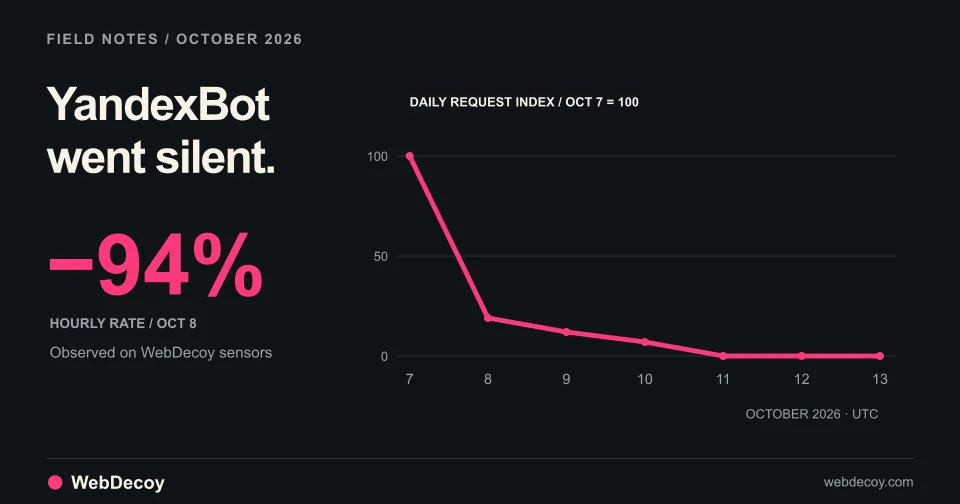
After reported strikes on Yandex data centers, YandexBot traffic on our sensors fell 94% on October 8 and stopped on October 10. Googlebot didn't move.
bot-detectionLike this post? Share it with your friends!
Get a personalized demo from our team.