
Bot Threat Scoring & Automated Response Rules
Bot threat scoring combines every detection into one 0-100 risk score. Use response rules to alert, or to block at your WAF, when a score threshold you control is crossed.
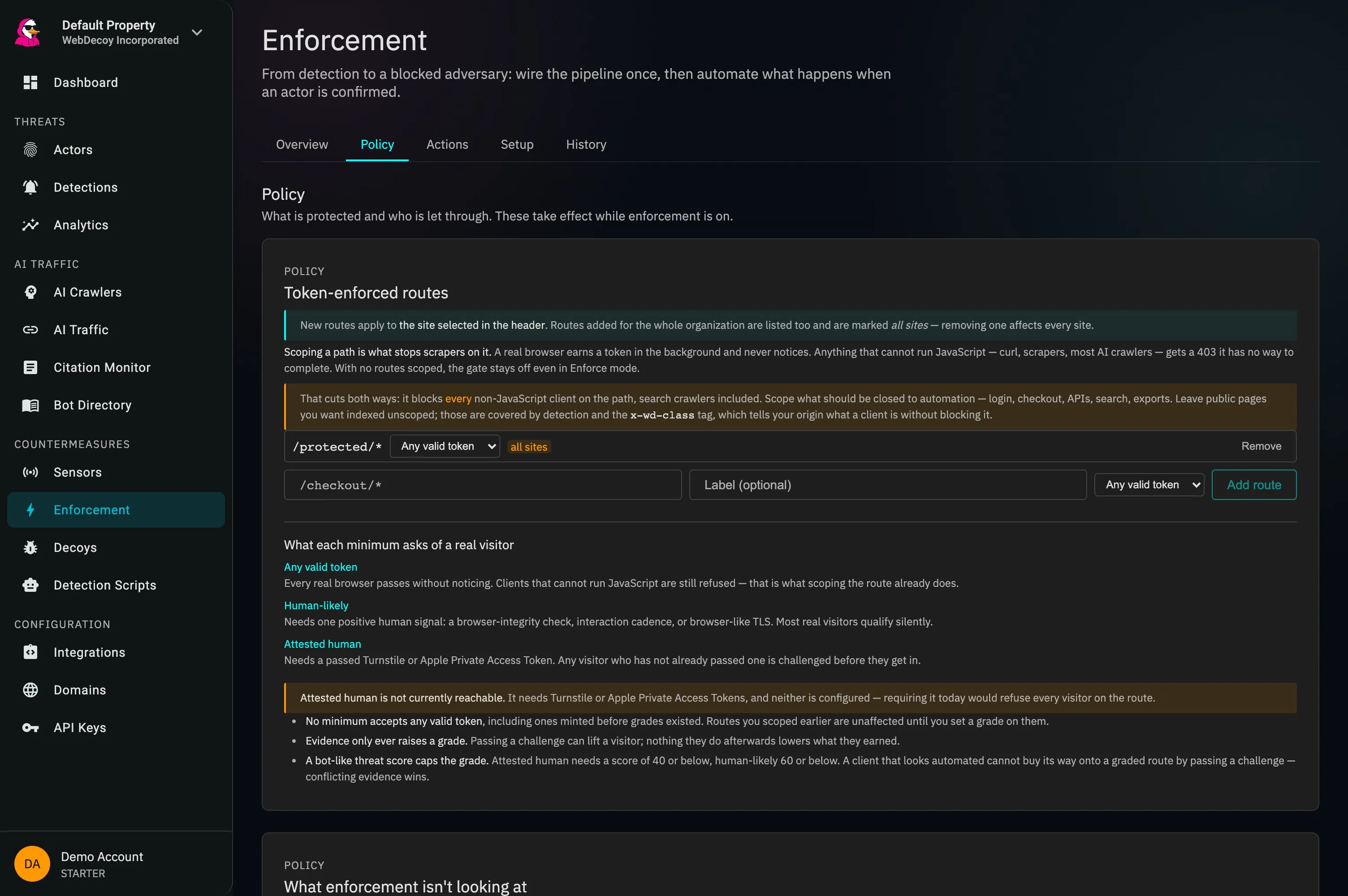
Policy in the product: token-enforced routes, and what each of the three trust grades asks of a real visitor.
Score Components
The unified score weighs nine components. Weights below are from the current scorer contract and sum to 100.
Threat Levels & Actions
Every detection gets a level. Response Actions fire on a score threshold you choose (default 80) or on a confirmed rotating actor, not per level.
MINIMAL
0-19
Little or no bot evidence
Most real visitors
LOW
20-39
Weak signals
Worth watching
MEDIUM
40-59
Several signals
Review when convenient
HIGH
60-79
Strong evidence
Review soon
CRITICAL
80-100
Default high-risk trigger
Trap hits and attack payloads land here
Start in monitor mode, review what would have been blocked, then decide where your threshold belongs.
Signature Scoring
Attack signatures detected in requests add points to the threat score. Multiple signatures can combine for high scores.
{
  "unified_score": 87,
  "threat_level": "CRITICAL",
  "threat_category": "attacker",
  "components": {
    "attack_signature_score": 50,
    "honeypot_score": 100,
    "ip_reputation_score": 60,
    "user_agent_score": 35
  },
  "attack_signatures": ["sql_injection"]
}A Queue of Judgments, Not a Config Screen
A score tells you how suspicious something looked. It does not tell you why. Enforcement decisions deserve evidence a human can check in three seconds, and that is only possible because deception produces explainable hits.
[pending]  9f3c4a71
           device · 40 IPs · 3 sites · 2h ago

why: requested /wp-admin-backup.php at 03:41:12
     (a path that exists nowhere on your site,
     linked only from a hidden element on /pricing)

[ Deny for 30 days ]  [ Dismiss ]  [ Open actor → ]
Every benchmarked competitor answers “why did you think this was a bot?” with an opaque detection ID or a number. A honeypot hit explains itself in one sentence, and that sentence is the entire credibility of an enforcement decision. It must never collapse to “threat 92.”
Monitor mode builds the list
A decoy hit in monitor mode writes a pending entry that affects nothing: never minting, never the edge config. By the time you enable enforcement, you are acting on a list you have already read.
Dismiss is as prominent as deny
A queue that only lets you say yes is one people stop opening. Dismissals are cheap to reverse, and an actor you dismissed that later trips a second decoy is resurfaced rather than silently re-queued.
Enforce is a gate, not a toggle
Complete the readiness checks for browser verification, protected paths, and your deployed validator. Netlify enforcement uses the extension’s validator; it does not require or configure Netlify Firewall Traffic Rules.
Counters that mean something
Every number shown as an outcome is an event count (mint attempts actually refused, requests actually challenged), never a row count dressed up as a result.
Clearance enforcement now runs on Netlify too. Cloudflare Workers, the Netlify extension, and AWS Lambda@Edge can check browser clearance on protected paths. A client without the required proof must verify or is refused, subject to configured exceptions. Provider WAF actions remain a separate layer. Set up Netlify protection or compare platform capabilities.
Integrations
Block at your WAF, alert your team, and forward detection events to your SIEM.
Cloudflare
WAF/Blocking
IP blocks; JA4 rules need Bot Management
AWS WAF
WAF/Blocking
IP sets and JA4 fingerprint rules
Fastly
WAF/Blocking
Access control lists
Vercel
Firewall
Configured IP blocking and challenges
Netlify
Edge validator
Opt-in clearance checks on protected paths
Slack
Notifications
Real-time alerts
CrowdStrike
SIEM
Falcon LogScale events
Datadog
SIEM
Detection events as logs
Webhooks
Custom
POST to any endpoint
Recommended Setup
Start with these integration combinations for effective protection.
Basic Protection
For most websites and applications.
- Cloudflare or AWS WAF for blocking
- Slack for real-time alerts
- Start in monitor mode, then set a block threshold
Comprehensive Security
For high-security or financial applications.
- WAF integration (Cloudflare/AWS)
- SIEM (CrowdStrike or Datadog)
- Slack + custom webhooks
- Block rotating actors at the WAF once reviewed
Why Automate Bot Blocking
Reviewing every alert by hand does not scale. Rules act on the evidence you have already approved.
Evidence First
Every block traces back to a detection you can inspect. Automatic blocking stays off until scores are calibrated; until then you approve blocks from the review queue.
Edge-Level Blocking
WebDecoy pushes a composite actor signature to your WAF and defaults to a challenge: the safe, cheap layer that stops datacenter and scripted bots before they reach your origin. Browser-grade rotators are caught by session clearance instead, so real users who share a fingerprint pass invisibly.
Scales Automatically
One rule covers every detection that matches its trigger, and IP blocks expire on their own so the list does not grow forever.
Learn More About Threat Response
Guides on integrating WebDecoy with your security infrastructure.
SIEM Integration Guide
Forward bot detections to Splunk, CrowdStrike, and Datadog.
WebDecoy & WAAP Integration
How honeypot intelligence integrates with Web Application and API Protection.
Bot Detection for Security Teams
How blue, red, and purple teams leverage bot detection intelligence.
See also: Decoy Links for honeypot traps, Endpoint Decoys for API honeypots, and Bot Scanner for client-side detection.
Frequently Asked Questions
Common questions about threat scoring and automated bot blocking.
How is the threat score calculated?
The threat score (0-100) combines nine weighted components. In the current scorer the weights are: honeypot matches 38, attack signatures 24, device fingerprint 11, behavior 10, TLS fingerprint 7, geo consistency 5, IP reputation 3, user agent 1, and headers 1. Some evidence also sets a floor (a trap hit from an address AbuseIPDB rates 80 or higher scores at least 85), and a single fingerprint seen rotating across many IPs escalates the score further.
What actions can be triggered based on threat scores?
A Response Action has one trigger (a confirmed rotating actor, a detection at or above a score threshold you set, default 80, or any detection) and one or more actions: block the actor at your WAF with a JA4 rule (rotating-actor trigger only), block the IP at your WAF with an automatic expiry, send a webhook, or email your team. Automatic blocking only acts once scores are calibrated; until then blocks are applied by you from the review queue. Slack and SIEM integrations forward detection events separately.
How does the Cloudflare WAF integration work?
When WebDecoy confirms an actor worth acting on, it writes a composite signature into your Cloudflare WAF (the JA4 combined with the actor's network and path scope, never a bare fingerprint) and defaults to a Managed Challenge, reserving outright blocks for honeypot-grade evidence. Every rule starts in monitor mode, carries an automatic expiry, and is reversible in one click; verified bots like Googlebot are always allowlisted, and "verified" now means a Web Bot Auth signature or a published IP range that checks out, never a user-agent string. The integration uses the Cloudflare API (Bot Management is required for the JA4 field) and is opt-in per route. This rule layer targets datacenter and scripted bots; browser-grade rotators are handled by session clearance, which a decoy hit revokes on every IP.
How does the verified-crawler allowlist work?
Turning on "allow AI crawlers" or "allow search engines" used to mean matching a user-agent substring, which is a spoofing hole: copying the GPTBot header is one line of code. Now an agent passes the allowlist only by proving its identity: a source IP inside the operator's published ranges with forward-confirmed reverse DNS, or a valid Web Bot Auth (RFC 9421) signature. The IP-range and rDNS path does the work today (it is what Google recommends for verifying Googlebot, and few operators sign yet), while signature verification runs alongside it and strengthens as adoption grows. An agent that only claims an identity fails the allowlist, and one that claims an identity it cannot prove is scored as agent impersonation. WebDecoy runs both checks itself, so this works on any zone rather than only Cloudflare.
Do I have to start blocking to get value from enforcement?
No, and you should not. Monitor mode runs with pass-through semantics: a decoy hit writes a pending deny-list entry with its evidence attached, but that entry never affects clearance minting or the edge config. You accumulate a reviewable list of confirmed bots while blocking nothing. When you do flip to Enforce, the UI tells you exactly what will happen ("14 pending devices will be denied, review them first"), and only the entries you approved are promoted. Enforce is gated by readiness checks that explain missing setup. Review the validator capabilities for your platform before relying on a saved policy.
Can a route require a minimum trust level?
Yes. Session clearance tokens now carry a graded trust level (clean, human-likely, or attested-human) along with the evidence that earned it, and a route scope can require a minimum. A session below the bar is challenged rather than passed. This is enforced today by the edge validator; SDK-side minimum-trust enforcement is in progress. Evidence only ever raises a grade and a high threat score caps it, so sessions that produce no evidence behave exactly as they did before.
Can I customize the threat score threshold?
Yes. The high-risk detection trigger defaults to a score of 80, and you can set your own threshold on each Response Action. Thresholds apply per rule, not per path.
How do I send bot detections to my SIEM?
WebDecoy forwards detection events to Splunk (HEC), CrowdStrike Falcon LogScale, and Datadog (as logs). Any other tool that accepts an HTTP POST can receive events through a generic webhook. Detection events include the threat score, attack signatures, IP metadata, and user agent analysis.
Ready to automate bot blocking?
Configure threat scoring rules that integrate with Cloudflare, AWS WAF, and your SIEM.
Get Started Free