
Edge Sensor
A JavaScript tag cannot see a client that never opens a browser. The edge sensor runs in front of your origin and catches the crawl pass itself: Googlebot, GPTBot, ClaudeBot, curl, and the ones forging their identity.
GET /robots.txt HTTP/1.1
User-Agent: Googlebot/2.1 (+http://www.google.com/bot.html)
CF-Connecting-IP: 142.111.58.63

// flags: known_crawler_ua, crawler_path
// forwarded to WebDecoy, response untouched

// server-side verification

// rDNS: acedatacenter.com
// ASN: not Google (15169)
// verdict: agent_impersonation
Now on Netlify: observation and opt-in protection
The WebDecoy Netlify extension injects a sensor into your next build. Add the three sensor variables to monitor traffic. Add WEBDECOY_ENFORCEMENT=on and redeploy to include the clearance validator, then configure protected paths and start in Monitor before enabling Enforce.
The Netlify validator verifies supported search engines through DNS and accepts Web Bot Auth signatures. Next.js middleware runs before it, so early middleware responses bypass the gate and rewrites change the path it checks.
Choose your platform
Start with the setup that matches where your site runs. Monitoring, request verification, and provider firewall actions are separate choices.
| Platform and setup guide | Detection | Protection |
|---|---|---|
| Netlify | Extension injects a crawler sensor at build time. | Opt-in clearance checks on protected paths; Monitor first, then Enforce. |
| Cloudflare | Managed Worker observes requests before your origin. | Worker clearance validation and separately configured WAF response actions. |
| Vercel | Log drain on Pro or Enterprise; Next.js SDK alternative. | Configure Firewall actions or SDK policy separately from the monitoring install. |
| AWS CloudFront | Browser script or SDK for detection. | Lambda@Edge clearance validator; optional AWS WAF integration. |
| WordPress | Plugin adds browser detection and decoy surfaces. | WordPress rules and form protection; an edge validator extends coverage before PHP. |
| Railway | SDK middleware for Express, Next.js, Fastify or Hono; one-click starters. | SDK policy in your app: Monitor first, then Enforce returns a 403. |
| Render | SDK middleware for Express, Next.js, Fastify or Hono; one-click starters. | SDK policy in your app: Monitor first, then Enforce returns a 403. |
| Shopify | App embed and Web Pixel cover storefront and checkout activity. | Order tagging and risk assessments support merchant decisions; no edge validator installed by the app. |
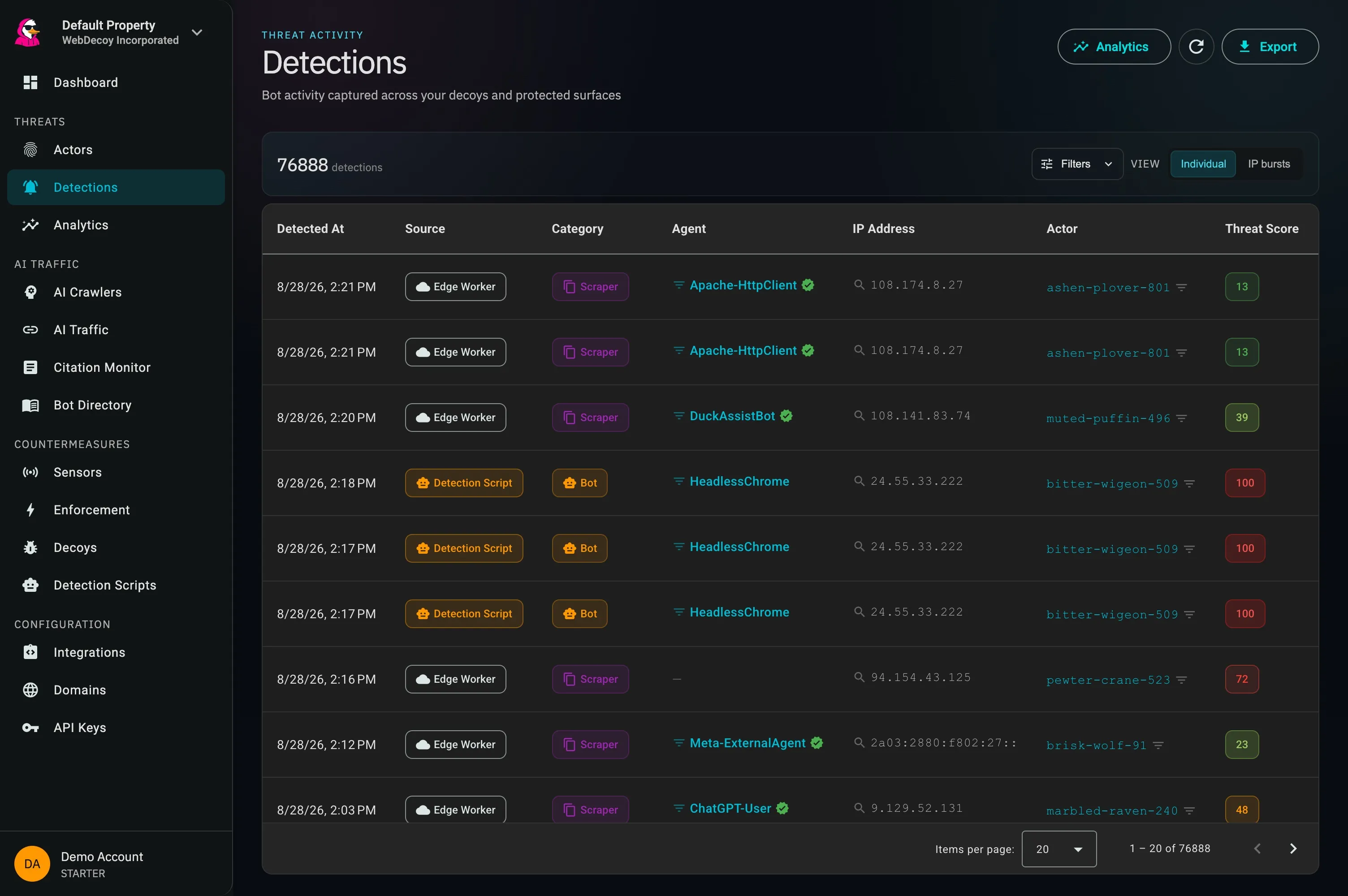
The sensor's output in context: Edge Worker rows, including verified DuckAssistBot and Meta-ExternalAgent visits, land in the same table as browser-side detections.
What Shows Up the Moment It’s On
No bait to place, no configuration to tune. The sensor starts reporting the automated clients already reaching your origin, the ones a page tag has never been able to show you.
Search & AI crawlers
Googlebot’s crawl pass, Bingbot, GPTBot, ClaudeBot, CCBot, PerplexityBot, ChatGPT-User, OAI-SearchBot, ByteSpider, Amazonbot, Applebot, Meta-ExternalAgent (on the pages they actually fetched).
Scripted HTTP clients
curl, wget, python-requests, Go HTTP clients, Scrapy, and the long tail of scrapers that never bothered with a browser at all.
Crawlers wearing a fake name
Requests claiming to be Googlebot from hosts that don’t forward-confirm to Google. Invisible to browser-side detection of any kind, because an impersonator running plain HTTP never executes the tag that would report it.
/robots.txt and your sitemaps come through too, the highest-purity crawler signal on any site, and the one a page tag can never see.
What Each Sensor Can and Cannot See
The page tag and the edge sensor have opposite blind spots. Running both is the point, because neither one sees the other’s traffic.
| Client or signal | Page tag | Edge sensor |
|---|---|---|
| Googlebot crawl pass | Not detected | Detected |
| GPTBot, ClaudeBot, CCBot, PerplexityBot | Not detected | Detected |
| curl, python-requests, scrapy | Not detected | Detected |
| Crawler impersonation (forged Googlebot) | Not detected | Detected |
| Headless Chrome, Puppeteer, Playwright | Detected | Detected |
| Mouse entropy, canvas and WebGL signals | Detected | Not detected |
| LLM referral traffic from ChatGPT, Perplexity | Detected | Not detected |
A Pre-Filter, Not a Detector
The Worker’s only job is deciding what is worth sending. It makes zero network calls and runs no async code. All the authoritative work (published IP-range verification, forward-confirmed reverse DNS, signature validation, the 186-agent registry) happens server-side, where it belongs.
The check JavaScript cannot make
Chrome 89 and later always send sec-ch-ua on a navigation request. A request claiming to be Chrome without it is lying. That check is structurally impossible from a page tag, because the impersonator never runs one. The edge is the only place it can exist.
| Flag | Rule |
|---|---|
| known_crawler_ua | Googlebot, GPTBot, ClaudeBot, CCBot, PerplexityBot, ByteSpider, Amazonbot, Applebot, Bingbot |
| http_client_ua | curl, wget, python-requests, go-http-client, scrapy, headless Chrome |
| crawler_path | Requests for /robots.txt or /sitemap*.xml |
| cf_verified_bot | Cloudflare’s own verified-bot category is set |
| missing_client_hints | User agent claims Chrome or Edge but sends no sec-ch-ua |
| wba_signature | A Signature-Agent or Signature-Input header is present |
| no_user_agent | No user agent at all |
Installing on Cloudflare
Integrations → Cloudflare → Edge Sensor. Four steps, and every one of them reversible.
Connect Cloudflare
Choose Connect with Cloudflare and approve the requested scopes. You can also connect with a scoped API token. The installation guide lists the required permissions.
Pick a Zone
Populated from your account, not free text. The route pattern is prefilled and editable, validated against Cloudflare’s rules.
Deploy
WebDecoy uploads the Worker, binds the route, and provisions the negating routes that keep it off your static assets.
Watch It Land
A live 24-hour detection count on the status card. If it is zero after an hour, the card says so and links to troubleshooting.
The Install Refuses More Than It Accepts
Deploying code onto someone else’s infrastructure from a button labelled “Deploy” deserves more caution than it usually gets. Preflight enumerates every existing script and route before writing anything.
| State on your zone | What happens |
|---|---|
| No Worker on the route pattern | Clean install |
| Our sensor, previously deployed by us | In-place upgrade |
| A WebDecoy Worker you deployed by hand | Adopt, with explicit confirmation |
| Someone else’s Worker on the same pattern | Refused, naming the pattern and script |
| DNS-only (grey-cloud) zone | Refused before anything is written |
The grey-cloud check matters more than it looks. Worker routes only fire on proxied, orange-clouded DNS records. A DNS-only zone accepts the route and the Worker simply never runs: a silent no-op that looks exactly like a successful install. We block it with a specific error rather than generating a support ticket three weeks later.
Monitoring Fails Open
The monitoring path reports in the background and leaves responses alone. Enabling enforcement is a separate choice that can intentionally challenge or refuse a request on a protected path.
- The origin response is returned unconditionally, before anything else happens
- The beacon runs inside
ctx.waitUntil(), never awaited on the response path - Every path is wrapped in try/catch; a throw is swallowed
- The beacon carries a hard
AbortSignal.timeout() - A config fetch failure serves stale config rather than disabling the sensor
The adversarial test suite asserts that ingest returning a 500, timing out, and failing DNS each leave the response untouched, and that a throw inside the filter still serves the origin response.
✓ ingest returns 500      → response untouched
✓ ingest times out        → response untouched
✓ ingest DNS fails        → response untouched
✓ classify() throws       → origin still served
✓ config fetch fails      → serves stale, stays up
✓ beacon never awaited on response path

// the response leaves before the beacon settles
Edge Sensor Features
Sees the Crawl Pass
Googlebot fetches your pages as plain HTTP with no DOM. GPTBot, ClaudeBot, CCBot and PerplexityBot never execute JavaScript at all. The sensor runs in front of your origin, where those requests actually are.
Catches Crawler Impersonation
Chrome 89+ always sends sec-ch-ua on a navigation. A request claiming Chrome without it is lying: a check that is structurally impossible from JavaScript, because the impersonator never runs any.
One-Click Install
Connect Cloudflare, pick a zone, deploy. WebDecoy uploads the Worker, binds the route, and provisions negating routes so static assets never invoke it. Uninstall is one click too.
Fails Open by Design
Monitoring leaves responses alone and sends reports in the background. Operational failures fail open; configured enforcement can intentionally challenge or refuse requests.
Tuned Without Redeploying
Flag set, patterns and sample rate live in remote config with a 60-second cache. We prune a noisy signal centrally and every deployed sensor picks it up within a minute.
Invocation Control
Negating routes keep the sensor off your static assets, so a busy site does not burn the Workers Free plan on .js and .css. Cloudflare Pages sites can use _routes.json instead.
Detection and Enforcement at the Edge
Two jobs, deliberately separated. The distinction is the safety property.
Detection
Never blocks, challenges, or modifies a response. It is a sensor: it watches and reports. Turning it on cannot change what any visitor sees.
Enforcement
Checks session clearance against your protected-path policy. In Monitor, requests pass while outcomes are recorded. In Enforce, a request without the required proof must verify or is refused, unless an access exception applies.
Choose the right scope. A clearance requirement can refuse non-browser clients on a protected path without first identifying a persistent browser actor. Leave public content unscoped when it should remain openly crawlable, and review verified-crawler exceptions. Provider WAF rules are a separate response layer. See Threat Scoring & Response.
Or Deploy It Yourself
The Worker is public. Cloudflare’s Deploy button clones it into your own GitHub or GitLab account and deploys to your Cloudflare account. Set WD_SITE_KEY to your organization id, and bind the route yourself.
The same repository contains an AWS Lambda@Edge function for CloudFront, which handles enforcement only.
Learn More
Cloudflare Edge Sensor: The Launch Post
How the one-click install works, what the sensor sees, and how enforcement runs in the same Worker.
Protect Content from AI Training Scrapers
What GPTBot, ClaudeBot and CCBot take, and the layers that actually stop them.
Next.js Bot Detection at the Edge
Edge middleware, honeypot routes, and the signal the edge genuinely cannot see.
See also: Bot Scanner for the browser-side half, Decoy Links for zero-false-positive deception, and Agent Identity for crawler verification.
Frequently Asked Questions
Common questions about the Cloudflare edge sensor.
Why can’t a JavaScript tag detect Googlebot or GPTBot?
A page tag identifies crawlers by reading navigator.userAgent, which requires a JavaScript runtime. Googlebot’s crawl pass is a plain HTTP fetch with no DOM. Rendering is a separate, deferred, heavily cached pass that may never happen for a given URL. GPTBot, ClaudeBot, CCBot and PerplexityBot do not execute JavaScript at all. The tag is not broken; it is running in the one place these clients never visit.
Does the edge sensor slow down my site?
No. The sensor forwards the origin response unconditionally and fires its beacon inside ctx.waitUntil(), so the beacon is never awaited on the response path. Every code path is wrapped in try/catch and the beacon carries a hard AbortSignal.timeout(). The test suite asserts that ingest returning a 500, timing out, and failing DNS each leave the response untouched, and that a throw inside the filter still serves the origin response.
Won’t a Worker on example.com/* fire on every static asset?
It would, so the installer provisions negating routes alongside the main route. A Cloudflare route with no script attached negates less specific patterns, and the most specific pattern wins. The default set covers common static prefixes across Astro, Next, Nuxt, SvelteKit, Vite, Hugo and WordPress, and you can add your own in the install UI. Cloudflare Pages sites can use _routes.json instead, where excluded paths never invoke the Function at all.
What happens if I already run a Worker on that route?
The install refuses and names the conflicting pattern and script. Cloudflare runs only one Worker per matched route, so silently winning the route would break your code. That is not ours to decide. If the existing Worker is a hand-deployed WebDecoy one, the installer offers to adopt it instead: take over management and rebind the route, with explicit confirmation of exactly what changes.
Does the edge sensor replace the JavaScript tag?
No, they are complements with opposite blind spots. The tag sees headless browsers, automation frameworks, mouse entropy, canvas and WebGL signals, and LLM referral traffic: everything that requires a browser. The sensor sees everything that never opens one. Neither sees the other’s traffic, so running both is the point.
Do I need a Cloudflare paid plan?
No. The sensor runs on Workers, available on the Free plan at 100,000 requests per day, and negating routes keep static assets from consuming that budget. The one capability that does require a paid tier is Cloudflare’s own bot score, which the sensor deliberately does not use. It reads the verified-bot category instead, which is available on every plan.
Can I deploy the sensor myself instead of using the button?
Yes. The Worker is public at github.com/WebDecoy/edge with a Deploy to Cloudflare button that clones it into your own GitHub or GitLab account. Set WD_SITE_KEY to your organization id from Integrations → Cloudflare, leave WD_API_BASE as the default, and bind the route yourself. The same repository also contains an AWS Lambda@Edge function for CloudFront, which handles enforcement only.
What is the difference between detection and enforcement in the Worker?
Detection reports automated traffic without blocking. Enforcement checks protected paths against your clearance policy. Cloudflare and Netlify support both, with different installation and crawler-verification capabilities. Start in Monitor and verify the deployed validator before enabling Enforce.
Stop guessing which crawlers reach your site
Connect Cloudflare or install the Netlify extension to see crawler requests and choose where clearance enforcement belongs.
Install the Edge Sensor