
Bot Scanner
JavaScript-based detection that analyzes browser characteristics and behavior to identify automated tools, headless browsers, and bots. Calculates a threat score from 0-100 for every visitor.
// Visitor loads page
// → Scanner JavaScript executes
// → Bot score calculated (0-100)
// → Detection sent to WebDecoy

// Illustrative example
{
  "signals": {
    "webdriver": true,
    "headless": true,
    "cdpArtifacts": true,
    "honeypotTriggered": false
  }
}
// → scored server-side and linked to an actor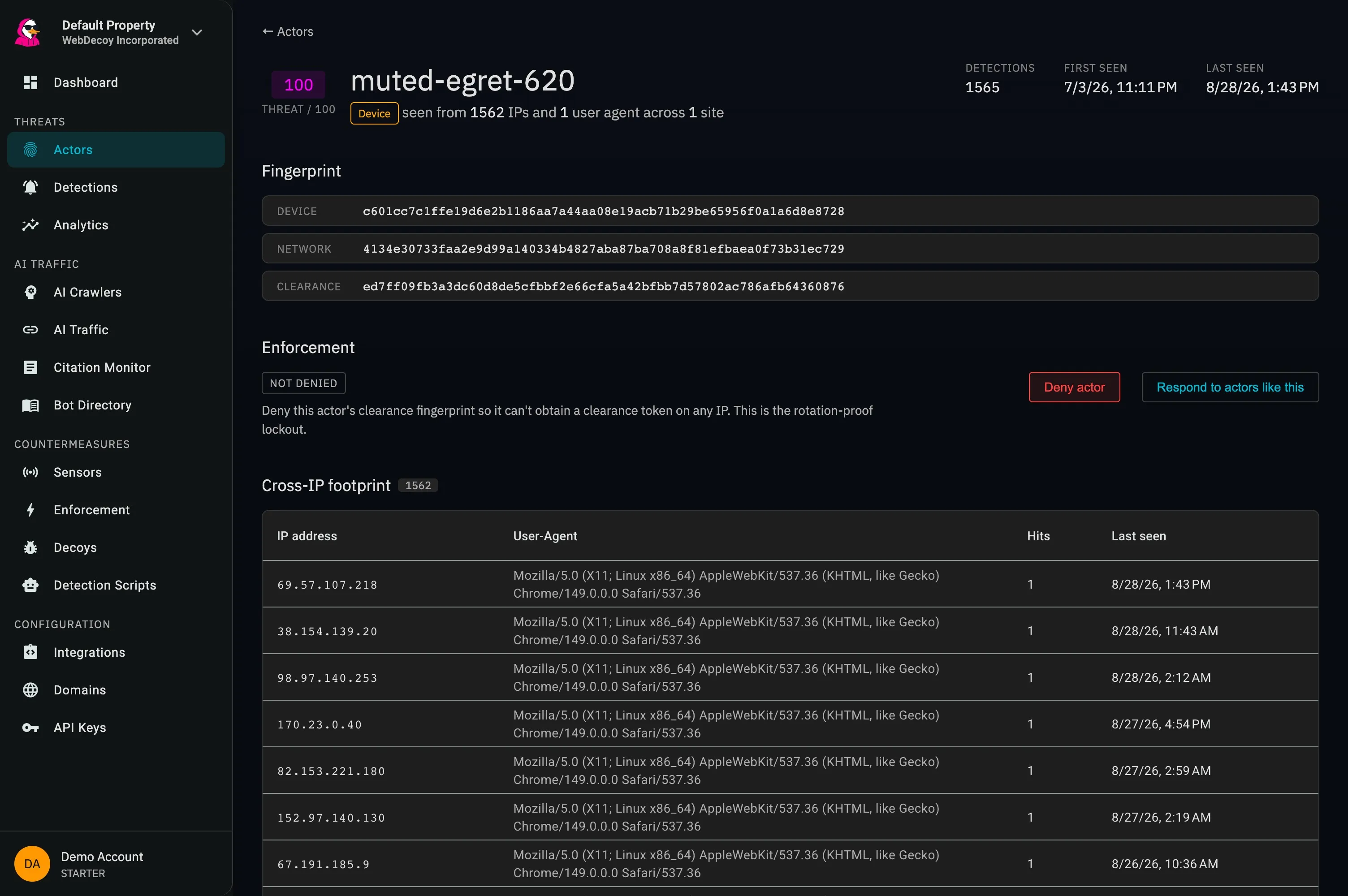
One actor, 1,562 rotating IP addresses, one unchanging user agent: the composite fingerprint holds the identity together.
How Bot Scanner Works
A lightweight JavaScript that runs client-side, analyzing dozens of signals to determine if a visitor is human or bot.
Page Load
Visitor loads your page with the scanner script
Signal Collection
Scanner analyzes browser, behavior, and fingerprints
Score Calculation
Threat score (0-100) calculated from signals
Actor Correlated
Linked to a persistent actor; enforcement (clearance revocation or a WAF rule) follows it across IPs
What Bot Scanner Analyzes
Multiple detection methods combine to create a comprehensive bot score. No single signal is definitive. It's the combination that matters.
<!-- Add before </body> -->
<script
  async
  src="https://cdn.webdecoy.com/bot-detection/v1/bot-detection.min.js"
  data-aid="your-property-uuid"
  data-sid="your-scanner-uuid"
></script>

<!-- Scanner auto-detects and reports -->
<!-- No additional code required -->
Detection Capabilities
WebDriver Detection
Detect Selenium, Puppeteer, and Playwright through WebDriver presence and automation markers.
Headless Browser Detection
Identify headless browsers via missing plugins, canvas fingerprinting anomalies, and WebGL inconsistencies.
AI Browser Identification
Flags AI browser agents and extensions that run JavaScript. Training crawlers like GPTBot and ClaudeBot do not run JS, so the Edge Sensor catches those instead.
Behavioral Analysis
Monitor mouse movements, scroll patterns, and form-filling speed to distinguish humans from bots.
Browser Fingerprinting
Canvas rendering, WebGL renderer, audio context, and timezone/language analysis.
Honeypot Field Watching
Watches hidden honeypot form fields already on your page and flags any visitor that fills one.
<!-- Your markup: the tag only reads it -->
<input
  type="text"
  name="website_url"
  class="honeypot"
  style="display: none"
  tabindex="-1"
  autocomplete="off"
/>

// The tag checks fields styled display: none
// or visibility: hidden, or with a "honeypot"
// class. A filled one sets honeypotTriggered.Honeypot Field Watching
Bot Scanner does not add anything to your page. If your forms already carry hidden honeypot fields, the tag reads them and reports any visitor that filled one in. Humans never see those fields, so a filled one is a strong bot signal.
Form Honeypots
Inputs hidden with display: none or visibility: hidden, or given a "honeypot" class. The tag flags visitors that fill them.
Link Honeypots
Hidden links are a separate feature: place a decoy link in your HTML and any bot that follows it is detected, with or without the tag.
Two-Phase Detection
AI browsers like Stagehand and Browserbase can pass a first look. The one Bot Scanner tag (formerly split into a lite and a Pro script) reports immediate signals on page load, then sends a behavioral update after 5 seconds of interaction.
// Phase 1: on page load
//   webdriver, headless, automationFramework,
//   cdpArtifacts, honeypotTriggered, ...

// Phase 2: after 5 seconds (or on unload)
//   canvas, webgl, audio,
//   mouseAnalysis, clickAnalysis, scrollAnalysis

// Both reports are scored server-side
// and linked to the same actor.
Why Client-Side Bot Detection Matters
Server-side detection misses critical signals that only the browser can provide.
Server-Side Only
- IP address and geolocation
- User agent string
- Request headers
- TLS fingerprint
- No browser behavior data
- No JavaScript execution analysis
Client-Side + Server-Side
- All server-side signals
- WebDriver and automation markers
- Canvas and WebGL fingerprints
- Mouse and keyboard behavior
- Form interaction timing
- Headless browser detection
Learn More About Bot Detection
Deep dives into headless browser detection and behavioral analysis.
LLM Referral Tracking
Track visitors arriving from ChatGPT, Perplexity, Gemini, and 8 more AI platforms.
Headless Browser Detection Guide
Technical deep dive into detecting Playwright, Puppeteer, and Selenium automation.
Bot Scanner Pro: AI Browser Detection
How two-phase detection catches Stagehand, Browserbase, and stealth plugins.
Detect AI Scrapers: GPTBot & ClaudeBot
How to identify GPTBot, ClaudeBot, and Perplexity crawlers.
See also: Decoy Links for honeypot traps, Edge Sensor for AI crawlers that never run JavaScript, Node.js SDK for server-side verification, and Threat Scoring for automated responses.
Frequently Asked Questions
Common questions about JavaScript bot detection and browser fingerprinting.
How does JavaScript bot detection work?
Bot Scanner runs as a lightweight JavaScript snippet on your web pages. It analyzes dozens of browser signals including navigator.webdriver presence, canvas fingerprinting, WebGL renderer data, plugin enumeration, and behavioral patterns like mouse movements and scroll behavior. These signals are combined to calculate a threat score from 0-100.
Can Bot Scanner detect Playwright, Puppeteer, and Selenium?
Yes. Bot Scanner specifically targets automation frameworks like Playwright, Puppeteer, and Selenium by detecting WebDriver markers, headless browser signatures, and automation-specific JavaScript properties. Even with stealth plugins enabled, these tools leave detectable traces.
What is browser fingerprinting and how does it detect bots?
Browser fingerprinting collects unique characteristics of a browser including canvas rendering output, WebGL renderer strings, audio context data, and hardware specifications. Bots often have inconsistent or missing fingerprint data that differs from real browsers.
Will Bot Scanner slow down my website?
No. The scanner script is lightweight (under 20KB gzipped) and loads asynchronously so it does not block page rendering. Detection runs in the background and sends results to WebDecoy without affecting user experience or page load times.
Is there a separate Bot Scanner Pro?
No. Bot Scanner Pro used to be a separate script; it has been folded into the one Bot Scanner tag. Every install gets two-phase detection: immediate signals on page load, then a behavioral update after 5 seconds (or when the page unloads) with mouse, click, and scroll analysis.
Ready to detect headless browsers and AI scrapers?
Start with client-side bot detection that catches Playwright, Puppeteer, and Selenium automation.
Get Started Free