
A Real Browser No Longer Proves a Human Is Visiting
Cloud-hosted AI agents reach forms and signup flows in full browsers. What the latest traffic research means for bot detection on your site.
bot-detectionRAG bots fetch content for human users in real-time, unlike training scrapers. Learn to detect Perplexity, ChatGPT Search, and when to block vs rate-limit.
Published · Updated
Last Updated: January 2026 | RAG bot IP ranges change frequently—verify against vendor documentation.
There’s a new class of AI bot hitting your infrastructure, and it’s fundamentally different from the training scrapers you’ve been blocking. When a user asks ChatGPT “what does Company X’s pricing page say?” or queries Perplexity about your product features, these systems don’t hallucinate an answer. They dispatch a bot to fetch your content in real-time.
This is Retrieval Augmented Generation (RAG), and the bots executing these fetches require a completely different detection and response strategy than traditional AI scrapers.
Most AI bot discussions conflate two fundamentally different use cases. Getting this distinction wrong corrupts your traffic data and leads to poor security decisions.
Understanding the architectural difference is essential:
TRAINING SCRAPER FLOW:
┌─────────────┐     ┌──────────────┐     ┌─────────────┐     ┌──────────┐
│   Crawler   │────▶│  Your Site   │────▶│  Database   │────▶│ Training │
│  (GPTBot)   │     │  (millions   │     │  (stored)   │     │  (weeks) │
└─────────────┘     │   of pages)  │     └─────────────┘     └──────────┘
                    └──────────────┘                               │
                                                                   ▼
                                                            ┌──────────┐
                                                            │   User   │
                                                            │  Query   │
                                                            └──────────┘

RAG BOT FLOW:
┌──────────┐     ┌─────────────────┐     ┌──────────────┐     ┌──────────┐
│   User   │────▶│  ChatGPT/      │────▶│  Your Site   │────▶│  Answer  │
│  Query   │     │  Perplexity    │     │  (1-5 pages) │     │ (seconds)│
└──────────┘     └─────────────────┘     └──────────────┘     └──────────┘
                         │                      │
                         │    ChatGPT-User/     │
                         └──── Perplexity-User ─┘
Training scrapers crawl systematically to collect data for model development:
| Characteristic | Training Scrapers |
|---|---|
| Purpose | Collect data to train/fine-tune models |
| Timing | Scheduled bulk crawls, often overnight |
| Pattern | Systematic, comprehensive site coverage |
| Volume | High, millions of pages per crawl |
| User context | None, operates independently |
| Examples | GPTBot, ClaudeBot, CCBot, Bytespider |
RAG bots fetch specific content to answer a user’s question in real-time:
| Characteristic | RAG Bots |
|---|---|
| Purpose | Answer a specific user query |
| Timing | On-demand, triggered by user questions |
| Pattern | Targeted, 1-5 pages per query |
| Volume | Lower per-request, but constant stream |
| User context | Human is waiting for the answer |
| Examples | ChatGPT-User, Perplexity-User, BingPreview |
Key Insight: A RAG bot request represents a human user who asked about your product. Blocking it might mean losing a potential customer. Blocking a training scraper just protects your content from unauthorized model training.
When a ChatGPT user triggers web search (either explicitly or when the model determines it needs current information), OpenAI dispatches ChatGPT-User:
User-Agent: Mozilla/5.0 AppleWebKit/537.36 (KHTML, like Gecko); compatible; ChatGPT-User/1.0; +https://openai.com/botKey behaviors:
This is notably better behavior than some competitors. In testing, ChatGPT-User demonstrates consistent, predictable patterns that make it easy to distinguish and policy appropriately.
IP verification: OpenAI publishes official IP ranges for ChatGPT-User, enabling you to verify requests aren’t spoofed.
Perplexity operates two distinct crawlers:
PerplexityBot (Training/Indexing):
User-Agent: Mozilla/5.0 AppleWebKit/537.36 (KHTML, like Gecko; compatible; PerplexityBot/1.0; +https://perplexity.ai/perplexitybot)https://www.perplexity.com/perplexitybot.jsonPerplexity-User (RAG):
User-Agent: Mozilla/5.0 AppleWebKit/537.36 (KHTML, like Gecko; compatible; Perplexity-User/1.0; +https://perplexity.ai/perplexity-user)https://www.perplexity.com/perplexity-user.jsonThe controversy: Cloudflare documented Perplexity using undeclared stealth crawlers that bypass blocks. When PerplexityBot was blocked on certain sites, requests continued from a different user agent:
User-Agent: Mozilla/5.0 (Macintosh; Intel Mac OS X 10_15_7) AppleWebKit/537.36 (KHTML, like Gecko) Chrome/124.0.0.0 Safari/537.36This stealth crawler:
Cloudflare’s bot management systems detected these requests as bots despite the disguise, demonstrating the value of behavioral detection over user-agent matching.
Microsoft’s AI assistant Copilot uses Bing’s infrastructure for web retrieval:
BingPreview (RAG for Copilot):
User-Agent: Mozilla/5.0 AppleWebKit/537.36 (KHTML, like Gecko; compatible; bingbot/2.0; +http://www.bing.com/bingbot.htm) Chrome/Key considerations for enterprise environments:
Enterprise Warning: If you’re blocking “bingbot” broadly, you may be blocking Copilot RAG queries from your own employees using Microsoft 365.
Apple’s approach to AI retrieval is privacy-focused:
AppleBot-Extended:
User-Agent: Mozilla/5.0 (Macintosh; Intel Mac OS X 10_15_7) AppleWebKit/537.36 (KHTML, like Gecko) Version/17.0 Safari/537.36 (Applebot-Extended)Applebot-Extended directivesUnlike other vendors, Apple’s privacy architecture means fetched content theoretically cannot be retained for training, though verification is impossible.
Google uses several AI-related crawlers:
| Crawler | Purpose |
|---|---|
| Google-Extended | AI training data collection (blockable via robots.txt) |
| Googlebot | Search indexing AND AI Overviews content |
The catch: You cannot block Google from using your content in AI Overviews without also blocking yourself from search results. Googlebot serves both purposes with no separate user agent for AI features.
User-Agent: Mozilla/5.0 AppleWebKit/537.36 (KHTML, like Gecko; compatible; ClaudeBot/1.0; [email protected])ClaudeBot is primarily a training crawler. Claude’s web search features (when enabled) use similar patterns but with less documented behavior than OpenAI’s approach.
Effective RAG bot detection requires multiple layers, each catching what the previous layer missed:
                    ┌───────────────────┐
                    │    HONEYPOTS      │  ← Zero false positives
                    │   (Layer 4)       │     Catches liars
                    └─────────┬─────────┘
                              │
                    ┌─────────▼─────────┐
                    │    BEHAVIORAL     │  ← Asset loading, timing
                    │    ANALYSIS       │     Catches stealth bots
                    │   (Layer 3)       │
                    └─────────┬─────────┘
                              │
                    ┌─────────▼─────────┐
                    │       TLS         │  ← Fingerprint mismatch
                    │  FINGERPRINTING   │     Catches spoofed UAs
                    │   (Layer 2)       │
                    └─────────┬─────────┘
                              │
                    ┌─────────▼─────────┐
                    │   USER-AGENT +    │  ← Basic identification
                    │  IP VERIFICATION  │     Catches honest bots
                    │   (Layer 1)       │
└───────────────────┘For vendors that publish IP ranges, cross-reference both:
CHATGPT_USER_IPS = load_openai_ip_ranges()
PERPLEXITY_IPS = load_json('https://www.perplexity.com/perplexity-user.json')

def verify_rag_bot(request):
    ua = request.headers.get('User-Agent', '')
    ip = request.remote_addr

    if 'ChatGPT-User' in ua:
        return ip in CHATGPT_USER_IPS  # True = legitimate
    if 'Perplexity-User' in ua:
        return ip in PERPLEXITY_IPS

    return None  # Unknown bot
Security Warning: If a vendor doesn’t publish IP ranges, don’t trust the user agent alone. Attackers spoof AI bot user agents to blend in with “acceptable” bot traffic.
RAG bots use specific HTTP clients that produce distinctive TLS fingerprints. A request claiming to be ChatGPT-User but presenting a curl or Python requests TLS fingerprint is fraudulent.
| Claimed Bot | Expected TLS Pattern | Mismatch Action |
|---|---|---|
| ChatGPT-User | OpenAI’s fetch client | Block immediately |
| Perplexity-User | Perplexity’s client | Block immediately |
| Chrome (from known AI IP) | Chrome-like | Likely stealth crawler |
WebDecoy’s TLS fingerprinting automatically detects these mismatches.
This is the highest-signal detection method for stealth crawlers. Real browsers request CSS, JavaScript, images, and fonts. RAG bots typically fetch only HTML.
def analyze_session_behavior(session_requests):
    """
    Detect stealth RAG bots by analyzing asset loading patterns.
    Real Chrome users load 30-100+ assets per page.
    RAG bots load 0-2 assets (maybe favicon).
    """
    html_requests = [r for r in session_requests if is_html(r)]
    asset_requests = [r for r in session_requests if is_asset(r)]

    if len(html_requests) > 0:
        asset_ratio = len(asset_requests) / len(html_requests)

        # Real browsers: 30-100 assets per HTML page
        # RAG bots: 0-2 assets per HTML page
        if asset_ratio < 5:
            return {
                'verdict': 'likely_bot',
                'confidence': 0.9 if asset_ratio < 1 else 0.7,
                'reason': f'Asset ratio {asset_ratio:.1f} (expected 30+)'
            }

    return {'verdict': 'likely_human', 'confidence': 0.6}

def is_asset(request):
    """Check if request is for a static asset."""
    asset_extensions = ['.css', '.js', '.png', '.jpg', '.gif', '.woff', '.woff2', '.svg']
    return any(request.path.endswith(ext) for ext in asset_extensions)
Detection signals for stealth crawlers:
| Signal | Real Chrome | Stealth RAG Bot |
|---|---|---|
| CSS files loaded | 5-20 | 0 |
| JavaScript executed | Yes (beacon fires) | No |
| Images requested | 10-50+ | 0-1 (favicon) |
| Fonts loaded | 2-5 | 0 |
| Time on page | 10-300 seconds | < 2 seconds |
Pro Tip: Inject a JavaScript beacon that reports back. If a “Chrome” user-agent never fires the beacon, it’s not Chrome.
Deploy invisible honeypot links to catch bots that claim to be answering user queries but are actually crawling comprehensively:
<a href="/internal-docs-2024" style="position:absolute;left:-9999px">Documentation</a>A real RAG bot answering “what’s your pricing?” has no reason to visit /internal-docs-2024. If it does, it’s lying about its purpose.
RAG bots create organizational tension that requires explicit governance.
| Team | Goal | RAG Bot Preference |
|---|---|---|
| Security | Reduce attack surface, control costs | Block everything |
| Infrastructure | Minimize server load | Aggressive rate limiting |
| Marketing/SEO | Appear in AI search answers | Allow everything |
| Legal | Protect IP, ensure compliance | Block training, allow RAG |
Without a governance framework, these competing priorities lead to inconsistent policies and finger-pointing when something goes wrong.
Establish clear organizational policy with these components:
1. Bot Classification Tiers
TIER 1 - TRUSTED (Allow with monitoring)
├── ChatGPT-User (verified IPs)
├── BingPreview (verified IPs)
└── AppleBot-Extended

TIER 2 - CONDITIONAL (Rate-limit, require verification)
├── Perplexity-User
├── Unverified AI user agents
└── New/unknown RAG bots

TIER 3 - BLOCKED (Zero tolerance)
├── Spoofed user agents (UA/IP mismatch)
├── Honeypot triggers
├── Known bad actors
└── Training scrapers (GPTBot, ClaudeBot, CCBot)
2. Cross-Functional Review Process
Before changing RAG bot policy:
3. Escalation Path
New RAG bot detected
        │
        ▼
┌───────────────────┐
│ Auto-classify as  │
│ TIER 2 (rate-     │
│ limited)          │
└─────────┬─────────┘
          │
          ▼ (within 48 hours)
┌───────────────────┐
│ Security + Mktg   │
│ joint review      │
└─────────┬─────────┘
          │
          ▼
┌───────────────────┐
│ Promote to TIER 1 │
│ or demote to      │
│ TIER 3            │
└───────────────────┘One of the biggest pain points: RAG bots “steal” traffic by giving users the answer directly. How do you measure impact?
Add RAG bot detection to your analytics pipeline:
// Server-side: Tag requests from known RAG bots
function tagRagBotRequest(request) {
  const ragBots = {
    'ChatGPT-User': 'openai',
    'Perplexity-User': 'perplexity',
    'bingbot': 'microsoft_copilot',  // Check referer for Copilot
    'Applebot-Extended': 'apple_intelligence'
  };

  const ua = request.headers['user-agent'];
  for (const [pattern, source] of Object.entries(ragBots)) {
    if (ua.includes(pattern)) {
      // Log to analytics
      analytics.track('rag_bot_fetch', {
        source: source,
        path: request.path,
        timestamp: Date.now(),
        ip_verified: verifyIpRange(request.ip, source)
      });
      return source;
    }
  }
  return null;
}Look for this pattern in your analytics:
Timeline:
─────────────────────────────────────────────────────────▶
     │                    │              │
     │                    │              │
     ▼                    ▼              ▼
RAG bot fetches      Traffic spike    Conversions
/pricing page        (30 min later)   (from AI referral?)
     │                    │              │
     └────────────────────┴──────────────┘
           Correlation window
Detection query (SQL):
-- Find traffic spikes following RAG bot fetches
WITH rag_fetches AS (
  SELECT
    path,
    DATE_TRUNC('hour', timestamp) as fetch_hour
  FROM access_logs
  WHERE user_agent LIKE '%ChatGPT-User%'
     OR user_agent LIKE '%Perplexity-User%'
),
hourly_traffic AS (
  SELECT
    path,
    DATE_TRUNC('hour', timestamp) as traffic_hour,
    COUNT(*) as visits
  FROM access_logs
  WHERE user_agent NOT LIKE '%bot%'
  GROUP BY 1, 2
)
SELECT
  r.path,
  r.fetch_hour,
  t.visits as traffic_after,
  LAG(t.visits) OVER (PARTITION BY r.path ORDER BY t.traffic_hour) as traffic_before,
  t.visits - LAG(t.visits) OVER (PARTITION BY r.path ORDER BY t.traffic_hour) as delta
FROM rag_fetches r
JOIN hourly_traffic t ON r.path = t.path
  AND t.traffic_hour = r.fetch_hour + INTERVAL '1 hour'
ORDER BY delta DESC;Some AI search engines include identifiable referrers:
| Source | Referrer Pattern |
|---|---|
| Perplexity | https://www.perplexity.ai/ |
| ChatGPT | Often empty or https://chat.openai.com/ |
| Copilot | https://copilot.microsoft.com/ or empty |
Track these in your analytics to measure AI-driven traffic:
// Client-side: Detect AI search referrals
const aiReferrers = [
  'perplexity.ai',
  'chat.openai.com',
  'copilot.microsoft.com',
  'gemini.google.com'
];

if (document.referrer) {
  const referrerHost = new URL(document.referrer).hostname;
  if (aiReferrers.some(ai => referrerHost.includes(ai))) {
    analytics.track('ai_search_referral', {
      source: referrerHost,
      landing_page: window.location.pathname
    });
  }
}Here’s where RAG bots require different thinking than training scrapers.
Block when:
Nginx:
# Block spoofed RAG bots (UA claims AI but IP doesn't match)
geo $ai_bot_ip {
    default 0;
    # OpenAI ChatGPT-User ranges
    23.98.142.176/28 1;
    40.84.180.224/28 1;
    # Add other verified ranges...
}

map $http_user_agent $is_claimed_ai_bot {
    default 0;
    "~*ChatGPT-User" 1;
    "~*Perplexity-User" 1;
}

# Block if claims to be AI bot but IP doesn't match
if ($is_claimed_ai_bot = 1) {
    set $block_check "claimed";
}
if ($ai_bot_ip = 0) {
    set $block_check "${block_check}_unverified";
}
if ($block_check = "claimed_unverified") {
    return 403;
}
Cloudflare Workers:
export default {
  async fetch(request, env) {
    const ua = request.headers.get('User-Agent') || '';
    const ip = request.headers.get('CF-Connecting-IP');
    const botScore = request.cf?.botManagement?.score || 99;

    // Known RAG bot patterns
    const ragBotPatterns = ['ChatGPT-User', 'Perplexity-User', 'Applebot-Extended'];
    const isClaimedRagBot = ragBotPatterns.some(p => ua.includes(p));

    if (isClaimedRagBot) {
      // Verify against known IP ranges (fetch from KV or hardcode)
      const verifiedIPs = await env.RAG_BOT_IPS.get('openai', { type: 'json' });
      const isVerified = verifiedIPs?.includes(ip);

      if (!isVerified) {
        return new Response('Forbidden: Unverified bot', { status: 403 });
      }

      // Add header for downstream analytics
      const response = await fetch(request);
      const newResponse = new Response(response.body, response);
      newResponse.headers.set('X-RAG-Bot', 'verified');
      return newResponse;
    }

    // Check Cloudflare bot score for stealth crawlers
    if (botScore < 30) {
      // Likely bot - could be stealth RAG crawler
      // Rate limit instead of block
      return new Response('Rate limited', { status: 429 });
    }

    return fetch(request);
  }
};
AWS WAF:
{
  "Name": "RAGBotVerification",
  "Priority": 1,
  "Statement": {
    "AndStatement": {
      "Statements": [
        {
          "ByteMatchStatement": {
            "SearchString": "ChatGPT-User",
            "FieldToMatch": { "SingleHeader": { "Name": "User-Agent" } },
            "TextTransformations": [{ "Priority": 0, "Type": "NONE" }],
            "PositionalConstraint": "CONTAINS"
          }
        },
        {
          "NotStatement": {
            "Statement": {
              "IPSetReferenceStatement": {
                "ARN": "arn:aws:wafv2:...:ipset/OpenAI-ChatGPT-User-IPs/..."
              }
            }
          }
        }
      ]
    }
  },
  "Action": { "Block": { "CustomResponse": { "ResponseCode": 403 } } },
  "VisibilityConfig": {
    "SampledRequestsEnabled": true,
    "CloudWatchMetricsEnabled": true,
    "MetricName": "BlockedSpoofedRAGBots"
  }
}Rate-limit when:
Recommended limits for RAG bots:
Verified RAG bots (ChatGPT-User from OpenAI IPs):
  - 60 requests/minute (allows answering queries)
  - Burst: 10 requests/second (for multi-page context)

Unverified but possible RAG bots:
  - 10 requests/minute
  - Challenge after threshold exceeded

Honeypot triggers:
- Immediate block (zero tolerance)Consider allowing when:
Business Consideration: When someone asks ChatGPT about your product category, do you want your content in the answer? If yes, blocking ChatGPT-User costs you visibility.
The industry is developing new standards specifically for AI content usage, beyond robots.txt.
Some publishers are experimenting with AI-specific HTTP headers:
X-Robots-Tag: noai
X-Robots-Tag: noimageai
X-Robots-Tag: noai, noimageai
Current support:
| Directive | Meaning | Vendor Support |
|---|---|---|
noai | Don’t use for AI training | Google (partial), others TBD |
noimageai | Don’t use images for AI | Google (Gemini) |
Reality Check: These headers are advisory only. RAG bots fetching content for real-time answers may ignore them entirely—the content isn’t being “trained on,” just displayed. Enforcement is nonexistent.
Proposed extensions to robots.txt for AI-specific control:
# Block AI training crawlers
User-agent: GPTBot
User-agent: ClaudeBot
User-agent: Google-Extended
Disallow: /

# Allow RAG bots (user-initiated fetches)
User-agent: ChatGPT-User
User-agent: Perplexity-User
Allow: /

# Block all AI uses (if this ever becomes standard)
User-agent: *
X-Robots-Tag: noai
The problem: There’s no enforcement mechanism. Well-behaved vendors comply; bad actors ignore it. Technical detection remains essential.
Use this script to analyze your access logs and identify RAG bot activity:
#!/bin/bash
# rag-bot-audit.sh - Analyze RAG bot traffic in access logs
# Usage: ./rag-bot-audit.sh /var/log/nginx/access.log

LOG_FILE="${1:-/var/log/nginx/access.log}"

echo "=== RAG Bot Traffic Audit ==="
echo "Log file: $LOG_FILE"
echo "Generated: $(date)"
echo ""

# Define RAG bot patterns
RAG_PATTERNS="ChatGPT-User|Perplexity-User|Perplexity-User|Applebot-Extended|bingpreview"
TRAINING_PATTERNS="GPTBot|ClaudeBot|CCBot|Bytespider|Google-Extended|anthropic-ai"

echo "=== RAG Bot Requests (Last 24 Hours) ==="
echo ""

# Count by bot type
echo "Requests by RAG bot type:"
grep -E "$RAG_PATTERNS" "$LOG_FILE" | \
  grep -oE "$RAG_PATTERNS" | \
  sort | uniq -c | sort -rn

echo ""
echo "=== Training Scraper Requests (for comparison) ==="
grep -E "$TRAINING_PATTERNS" "$LOG_FILE" | \
  grep -oE "$TRAINING_PATTERNS" | \
  sort | uniq -c | sort -rn

echo ""
echo "=== Top Pages Fetched by RAG Bots ==="
grep -E "$RAG_PATTERNS" "$LOG_FILE" | \
  awk '{print $7}' | \
  sort | uniq -c | sort -rn | head -20

echo ""
echo "=== Hourly RAG Bot Traffic Pattern ==="
grep -E "$RAG_PATTERNS" "$LOG_FILE" | \
  awk '{print $4}' | \
  cut -d: -f2 | \
  sort | uniq -c | \
  awk '{printf "%02d:00 - %s requests\n", $2, $1}'

echo ""
echo "=== Potential Stealth Crawlers ==="
echo "(High-frequency IPs with Chrome UA but no asset requests)"
echo ""

# Find IPs claiming Chrome but requesting only HTML
grep -i "Chrome" "$LOG_FILE" | \
  grep -v -E "\.(css|js|png|jpg|gif|woff|svg)" | \
  awk '{print $1}' | \
  sort | uniq -c | sort -rn | \
  awk '$1 > 50 {print $1 " requests from " $2 " (no assets loaded)"}' | \
  head -10

echo ""
echo "=== Recommendations ==="
echo "1. Verify high-volume RAG bots against published IP ranges"
echo "2. Investigate 'stealth crawler' IPs for asset loading patterns"
echo "3. Check if top-fetched pages align with your SEO priorities"
Python version for more detailed analysis:
#!/usr/bin/env python3
"""
rag_bot_audit.py - Detailed RAG bot traffic analysis
Usage: python rag_bot_audit.py /var/log/nginx/access.log
"""

import re
import sys
from collections import defaultdict
from datetime import datetime

RAG_BOTS = {
    'ChatGPT-User': 'openai',
    'Perplexity-User': 'perplexity',
    'PerplexityBot': 'perplexity_index',
    'Applebot-Extended': 'apple',
    'bingpreview': 'microsoft'
}

TRAINING_BOTS = ['GPTBot', 'ClaudeBot', 'CCBot', 'Bytespider', 'Google-Extended']

def parse_log_line(line):
    """Parse nginx combined log format."""
    pattern = r'(\S+) .* \[(.+?)\] "(\S+) (\S+) .*" (\d+) .* ".*" "(.*)"'
    match = re.match(pattern, line)
    if match:
        return {
            'ip': match.group(1),
            'timestamp': match.group(2),
            'method': match.group(3),
            'path': match.group(4),
            'status': match.group(5),
            'user_agent': match.group(6)
        }
    return None

def identify_bot(user_agent):
    """Identify bot type from user agent."""
    for pattern, bot_type in RAG_BOTS.items():
        if pattern in user_agent:
            return ('rag', bot_type)
    for pattern in TRAINING_BOTS:
        if pattern in user_agent:
            return ('training', pattern)
    return (None, None)

def main(log_file):
    rag_stats = defaultdict(lambda: {'requests': 0, 'paths': defaultdict(int), 'ips': set()})
    training_stats = defaultdict(int)
    suspicious_ips = defaultdict(lambda: {'html': 0, 'assets': 0, 'ua': set()})

    with open(log_file, 'r') as f:
        for line in f:
            parsed = parse_log_line(line)
            if not parsed:
                continue

            bot_category, bot_type = identify_bot(parsed['user_agent'])

            if bot_category == 'rag':
                rag_stats[bot_type]['requests'] += 1
                rag_stats[bot_type]['paths'][parsed['path']] += 1
                rag_stats[bot_type]['ips'].add(parsed['ip'])
            elif bot_category == 'training':
                training_stats[bot_type] += 1
            elif 'Chrome' in parsed['user_agent']:
                # Track potential stealth crawlers
                ip = parsed['ip']
                suspicious_ips[ip]['ua'].add(parsed['user_agent'][:50])
                if re.search(r'\.(css|js|png|jpg|gif|woff)', parsed['path']):
                    suspicious_ips[ip]['assets'] += 1
                else:
                    suspicious_ips[ip]['html'] += 1

    # Output report
    print("=" * 60)
    print("RAG BOT TRAFFIC AUDIT REPORT")
    print("=" * 60)
    print(f"\nGenerated: {datetime.now()}")
    print(f"Log file: {log_file}\n")

    print("RAG BOT SUMMARY")
    print("-" * 40)
    for bot_type, stats in sorted(rag_stats.items(), key=lambda x: -x[1]['requests']):
        print(f"\n{bot_type.upper()}")
        print(f"  Total requests: {stats['requests']}")
        print(f"  Unique IPs: {len(stats['ips'])}")
        print(f"  Top pages:")
        for path, count in sorted(stats['paths'].items(), key=lambda x: -x[1])[:5]:
            print(f"    {count:5d}  {path[:60]}")

    print("\n" + "=" * 60)
    print("TRAINING SCRAPERS (for comparison)")
    print("-" * 40)
    for bot, count in sorted(training_stats.items(), key=lambda x: -x[1]):
        print(f"  {bot}: {count} requests")

    print("\n" + "=" * 60)
    print("POTENTIAL STEALTH CRAWLERS")
    print("-" * 40)
    print("(Chrome UA with low asset-to-HTML ratio)\n")

    for ip, data in sorted(suspicious_ips.items(), key=lambda x: -x[1]['html']):
        if data['html'] > 50 and data['assets'] < data['html'] * 0.1:
            ratio = data['assets'] / data['html'] if data['html'] > 0 else 0
            print(f"  {ip}")
            print(f"    HTML requests: {data['html']}")
            print(f"    Asset requests: {data['assets']}")
            print(f"    Asset ratio: {ratio:.2%} (expected: 3000%+)")
            print(f"    VERDICT: Likely bot")
            print()

if __name__ == '__main__':
    if len(sys.argv) < 2:
        print("Usage: python rag_bot_audit.py /path/to/access.log")
        sys.exit(1)
main(sys.argv[1])Track RAG bots separately from training scrapers in your analytics:
{
  "event": "rag_bot_request",
  "timestamp": "2026-01-13T14:30:00Z",
  "bot_type": "chatgpt_user",
  "verified": true,
  "source_ip": "23.98.142.180",
  "path": "/pricing",
  "pages_in_session": 2,
  "honeypot_triggered": false,
  "response_code": 200,
  "rate_limited": false
}Track these metrics for RAG bots specifically:
| Metric | What It Tells You |
|---|---|
| RAG requests/day by bot type | Which AI search engines send users to you |
| Pages per RAG session | Are bots answering queries or training? |
| Verification rate | How many claimed AI bots are spoofed? |
| Honeypot trigger rate | Are bots lying about being query-driven? |
| Rate-limit hits | Is your threshold appropriate? |
Send RAG bot events to your SIEM for correlation with other security data:
{
  "event_type": "ai_rag_bot_detected",
  "threat_level": "informational",
  "bot_identity": "perplexity_user",
  "ip_verified": true,
  "behavior_anomaly": false,
  "action_taken": "rate_limited"
}
See our SIEM integration guide for full setup.
The RAG bot landscape is evolving rapidly:
OpenAI is implementing cryptographic request signing through the Web Bot Auth standard. This enables:
As adoption spreads, expect this to become the standard for legitimate RAG bot verification.
RAG bots are the precursor to full AI agents that browse, interact, and transact on behalf of users. Today’s detection approaches for RAG bots will inform tomorrow’s agent authentication systems.
See our coverage of agentic commerce challenges for where this is heading.
Take this to your next security review:
RAG bots aren’t just another scraper variant. They represent a fundamental shift in how users discover and interact with web content. When you block ChatGPT-User, you’re not just protecting content from training; you’re making yourself invisible to users who search via AI.
The bottom line:
WebDecoy provides the detection capabilities to make these distinctions:
The AI search era is here. Your detection strategy needs to evolve with it.
Need help implementing RAG bot detection? Contact our team or explore our bot detection solutions.
Cloud-hosted AI agents reach forms and signup flows in full browsers. What the latest traffic research means for bot detection on your site.
bot-detection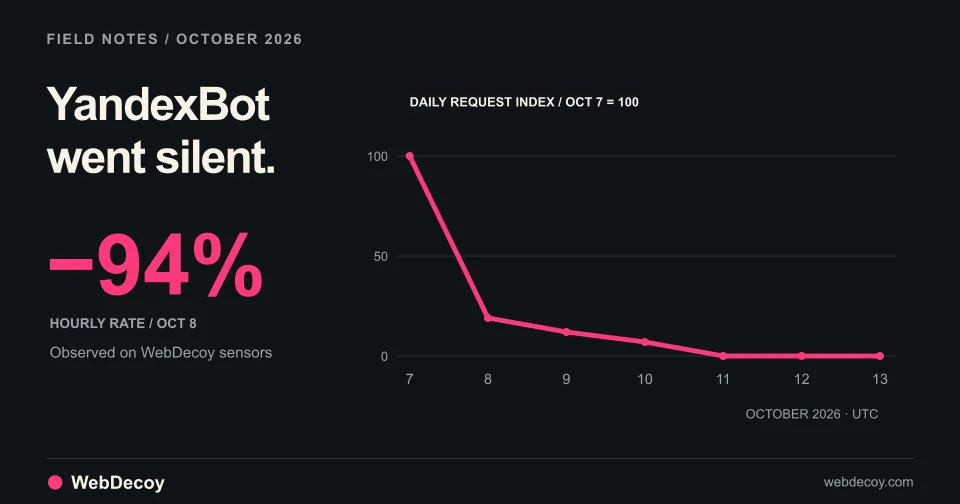
After reported strikes on Yandex data centers, YandexBot traffic on our sensors fell 94% on October 8 and stopped on October 10. Googlebot didn't move.
bot-detection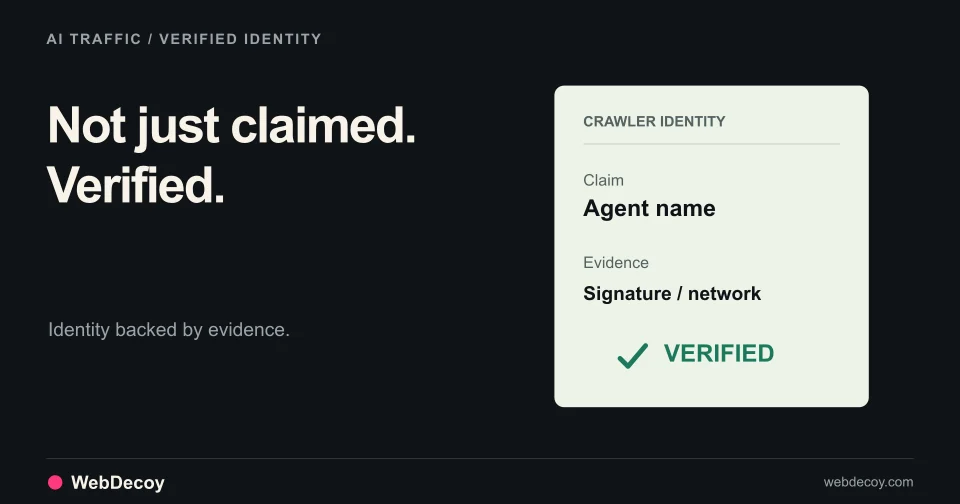
See which AI crawlers proved who they are, which pages AI assistants fetched for real people, and how many visitors each AI product sent back.
bot-detectionLike this post? Share it with your friends!
Get a personalized demo from our team.