Automated accounts can consume welcome offers, flood communities, and create work for support teams. Add browser signals and form verification at registration, then compare the evidence with account creation and promotion-redemption events in your own system.
02
Scripted logins put player accounts at risk
Repeated credential attempts can move across addresses and look like unrelated sessions. Available device and network signals help your team investigate recurring automation alongside authentication failures, account recovery events, and player reports.
03
Automated browsers imitate ordinary sessions
A bot running in a real browser can load the same pages and forms as a player. Behavioral detection and decoy interactions provide additional evidence to examine when a session repeatedly reaches account or promotional workflows.
Inside WebDecoy
Give account review more context.
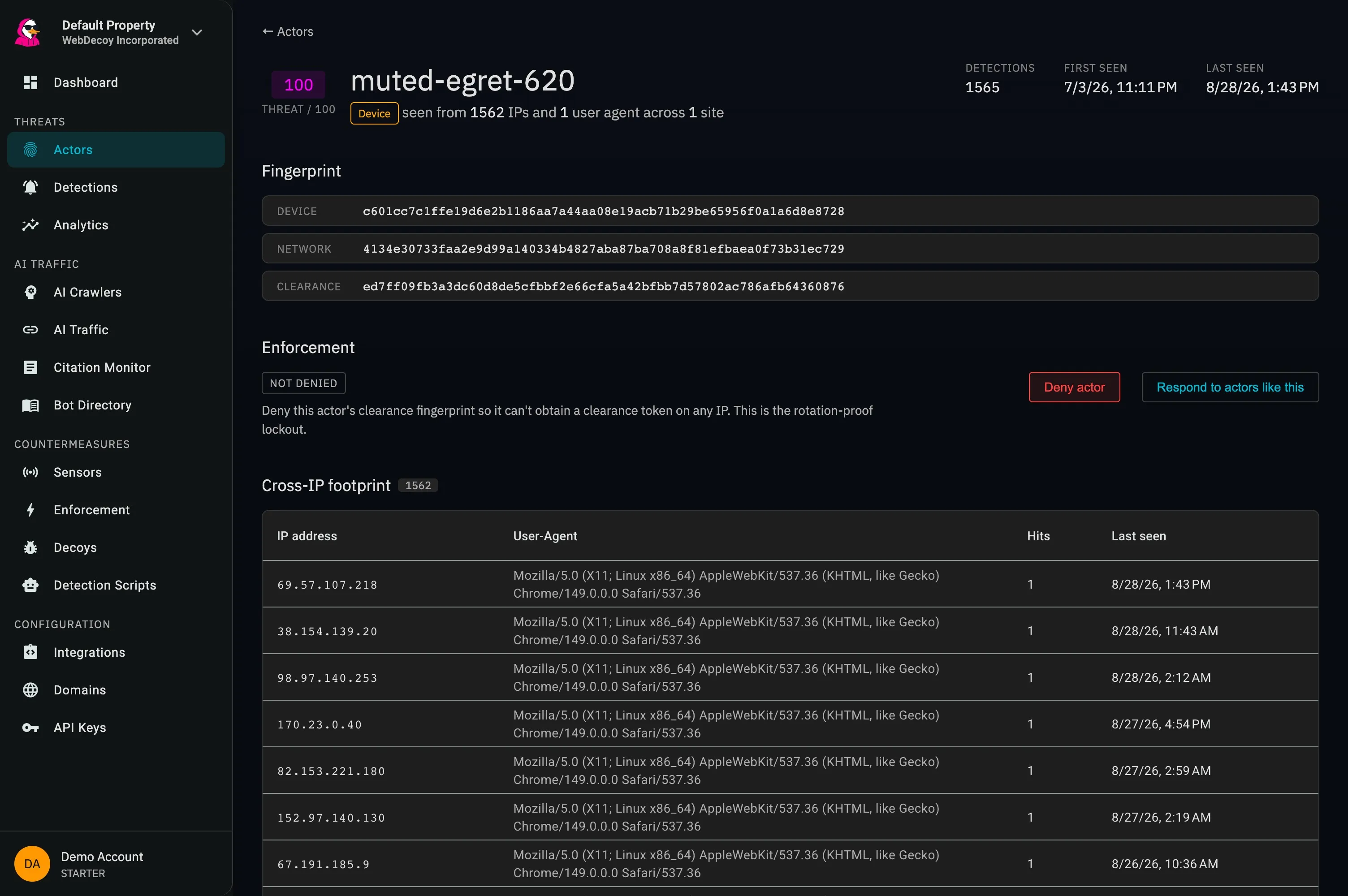
The real actor detail screen connects related addresses, fingerprints, and detection history. Use that view alongside your account records to investigate recurring automation. Shared device or network signals are investigation context, not proof that accounts belong to the same person.
app.webdecoy.com/actors
Actual WebDecoy interface. Product views shown with recorded traffic.
How it fits
Follow a registration through to review.
01
Instrument the account journey
Add Bot Scanner to registration and login pages you control. Observe automated browser signals in monitor mode and compare the activity with your account events before changing the player experience.
Use form verification at account creation and validate the result on the server before provisioning an account. Keep promotion eligibility decisions in your application, where redemption history and account rules are available.
Connect available actor evidence with registration and login records. Review detections, then apply approved responses through a supported application or WAF integration. Keep the scope tied to the affected account routes.
For a browser-based platform, begin with the registration page and the server endpoint that creates accounts. Add login coverage after reviewing normal sessions. A JavaScript tag on your website does not instrument a native game client; coverage depends on the website and server integrations you deploy.
Does WebDecoy detect cheating inside a native game?
WebDecoy focuses on automated website and application activity through its supported integrations. Browser detection does not inspect a native game process or replace game-specific anti-cheat systems. Start with web registration, login, and account-management journeys.
Can bot evidence establish bonus abuse or multiple-account ownership?
Bot evidence can support an investigation, but it cannot establish promotion eligibility or account ownership by itself. Correlate detections with your own account and redemption records, and account for legitimate players who share a device or network.
Can we evaluate protection without interrupting players?
Start in monitor mode and review observed automation alongside normal account activity. Test any form verification on the routes you intend to protect, then enable supported enforcement after checking the expected effect on legitimate registrations and logins.